
How fast does my home builder website need to be and is my website fast enough? Most home builders I talk with think so. They checked it once on the office Wi-Fi, it looked great, and they moved on.
Here’s the problem. Your home shoppers aren’t on your office Wi-Fi. They’re on a phone, in the car, or between model home visits. Google PageSpeed Insights can test that experience by simulating a mid-range phone over a slow 4G connection.
I relearned this lesson with our own website, which we just redesigned.
How Slow Is Too Slow for a Home Builder Website?
Google draws the line at 2.5 seconds. That’s its “good” mark for Largest Contentful Paint (LCP), the time it takes for the largest piece of content on the page to appear. Beyond 2.5 seconds, Google rates a page “needs improvement.” Beyond 4 seconds, it’s “poor” (Google, web.dev).
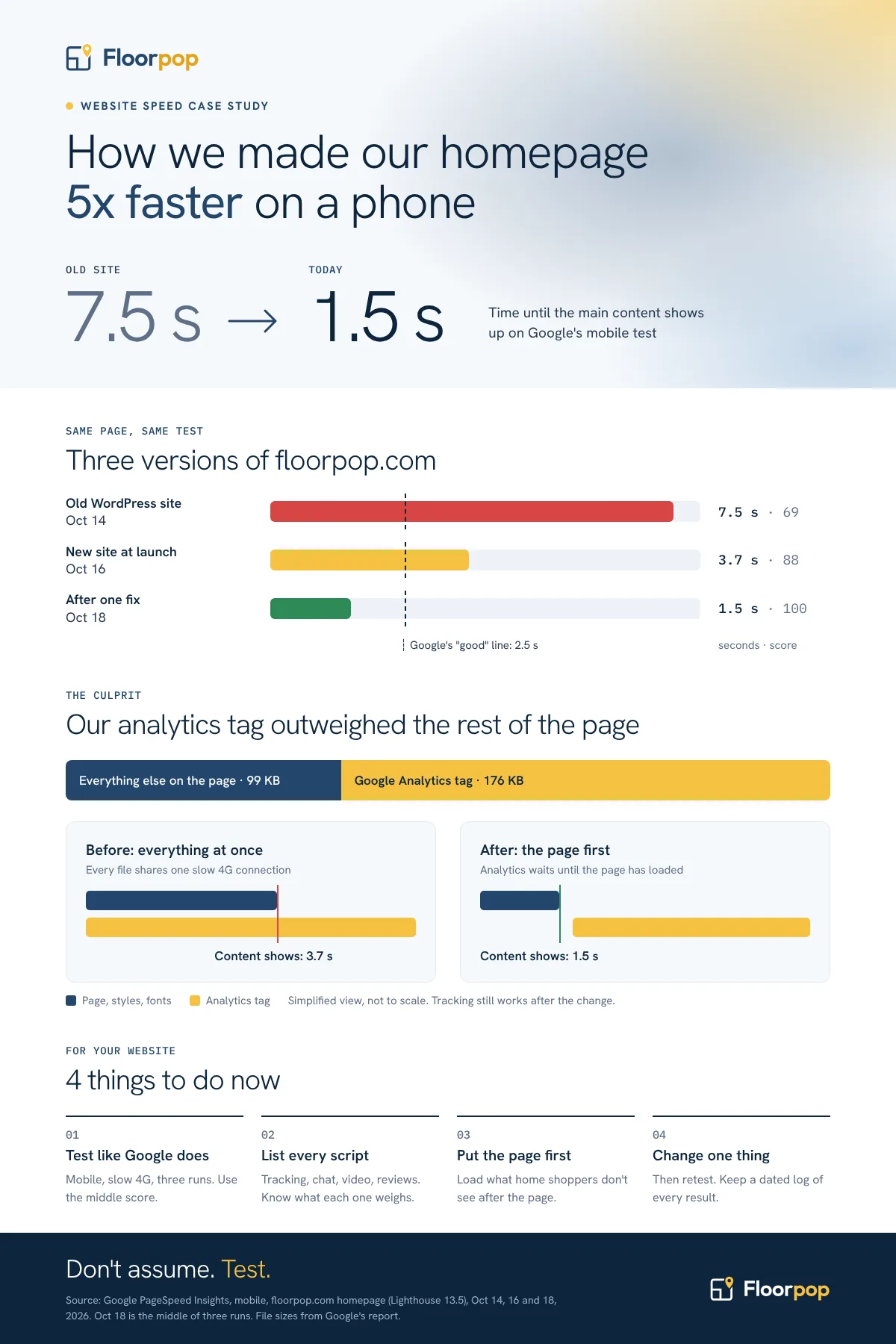
Our old WordPress homepage took 7.5 seconds in Google’s mobile test. Its performance score was 69 out of 100. Honestly, it was abysmal for an SEO’s own website. Many reasons, but it’s all on me. So, we rebuilt floorpop.com from scratch, and the new site launched on October 16, 2026.
Our Wake-Up Call: A Brand-New Website That Still Scored 88
The new site was a huge step up. LCP measures when the largest visible piece of content appears. Think of it as checking when a home’s main walls and roof are up, rather than waiting for every finishing touch. Ours dropped from 7.5 to 3.7 seconds. Accessibility, best practices, and SEO all scored a perfect 100.
But 3.7 seconds is still over Google’s guideline. On a brand-new website. I’ll admit that one stung.
Two days later, the homepage scored 100 and loaded its main content in 1.5 seconds. The fix was one small change. Finding it took some work. Here it is.
How to Fix a Slow Website in 4 Steps
Step 1: Assess Your Website the Way Google Does
Run your homepage through Google PageSpeed Insights and check the Mobile tab first. Google uses the mobile version of your content for indexing and ranking. The mobile lab score helps you diagnose problems; it isn’t your search ranking.
Don’t stop at the score. Scroll down to the LCP breakdown. It shows which element is slow and where the time is spent.
Ours was the homepage’s opening paragraph. In that test, PageSpeed Insights reported time to first byte as zero. The 1.3-second delay before the text appeared pointed us toward what happened after the page arrived.
Step 2: Find What’s Slowing Down Your Website
Make a list of suspects and rule them out one at a time. Ours were web fonts, design effects, the stylesheet, and third-party scripts.
The fonts were already set up correctly. No animation was hiding the text. The stylesheet was tiny.
The culprit was our Google Analytics tag. At 176 KB, it was larger than everything else on the homepage combined (99 KB). It loaded at the same time as the page. On a slow phone connection, the words a home shopper came to read had to share bandwidth with a tracking script.
Sound familiar? Chat widgets, video players, review feeds, retargeting pixels, and scheduling tools. Each was probably added for a good reason. Each competes with your homepage for that same slow connection.
Step 3: Set Up a Speed Test You Can Repeat
A single test proves nothing. Our scores swung from 86 to 96 on the same page, on the same morning, with no changes at all.
So, we set up Google’s own test to run three times, record the middle result, and keep a dated log of every run. If your web team wants to automate it, Google offers the same test through its free PageSpeed Insights API.
Now every change is measured the same way. No more debating based on one lucky (or unlucky) run.
Step 4: Fix One Thing, Then Retest Your Page Speed
We changed just one thing. Google Analytics now loads after the page finishes loading, rather than alongside it. Page views and lead events queue up until the tag loads. A visitor who leaves before it loads may not be counted.
Then we retested: 99, 100, and 100. LCP dropped from 3.7 seconds to 1.5.
One caution: make sure the change is live before you judge it. Our first retest, about a minute after publishing, came back worse, with three identical results. Google had most likely tested a stale copy. Nine minutes later, the real numbers came in.
The Results: 5x Faster Than Our Old Website
| Mobile homepage | Old WordPress site (Oct 14) | New site at launch (Oct 16) | After the fix (Oct 18) |
|---|---|---|---|
| Performance score | 69 | 88 | 100 |
| Largest Contentful Paint | 7.5 s | 3.7 s | 1.5 s |
| Speed Index | 4.5 s | 2.6 s | 1.5 s |
Source: Google PageSpeed Insights, mobile, floorpop.com homepage (Lighthouse 13.5). The October 18 figures are the middle of three runs.
What This Means for Your Home Builder Website
Your website is the hub of your marketing system. Speed is one part of SEO for home builders. Every second it takes to load on a phone is a second a home shopper can hit the back button and go to a competitor or a listing site.
Here’s a simple prescription:
-
Test like Google does: Mobile, slow 4G, three runs. Use the middle score and keep a log.
-
Read the LCP breakdown: It names the slow element and shows where the time goes. Fix that first.
-
Weigh every script: List every tag, widget, and pixel on your homepage and what each one weighs. If it doesn’t help you sell homes, cut it.
-
Put the page first: Load anything the home shopper doesn’t see, like tracking and pixels, after the page.
-
Change one thing, then retest: Otherwise you’ll never know what worked.
-
Measure the impact on engagement: Compare mobile engagement rate, bounce rate, views per session, and lead conversion rate before and after the change. In GA4, bounce rate is the percentage of sessions that were not engaged. Compare similar traffic periods, and account for tracking changes.
A lab test is a controlled benchmark, not every visitor’s experience. Once your site has steady traffic, check the Core Web Vitals report in Google Search Console to see how real visitors fare.
Don’t assume. Test!
If you’d like a second set of eyes on your website’s speed, I’d be glad to take a look. Request a free home builder SEO audit, and let me know what you think.